


Help And Support
Cards - General
-
Revision of OCBC Credit Cards interest rate from 26.88% to 27.78% effective 8th May 2023
From 8 May 2023, the interest rate applied to the outstanding balance for all OCBC credit cards will be 27.78% instead of 26.88% per annum. If the minimum amount is not paid by the due date, a higher interest rate of 30.78% per annum will apply.
-
Additional Interest and Overlimit Fee for Credit Card (with effect from 19 Nov 2021)
-
What is an overlimit fee?
An overlimit fee is a fee charged by the bank when a customer’s total outstanding balances across all credit cards exceed their assigned credit limit.
-
When will an account go into overlimit?
Your account may go into overlimit if you fully utilise your available credit limit and subsequently incur interests, fees and charges. Some examples include currency conversion fee for overseas purchases and prevailing interest charges on outstanding balances past due.
-
If I have multiple credit cards with different credit limit, will I be charged an overlimit fee if I exceed the credit limit for one of my credit cards?
You will be charged an overlimit fee if your total outstanding balances exceed your combined credit limit.
Example #1
Combined credit limit S$12,000Credit Limit Outstanding Balance on Statement Card A S$10,000 S$11,000 Card B S$2,000 S$500 Card C S$12,000 S$0 In the example above, the total outstanding balance of S$11,500 is within the combined credit limit of S$12,000. Hence, an overlimit fee will not be charged.
Example #2
Combined credit limit S$12,000Credit Limit Outstanding Balance on Statement Card A S$10,000 S$11,000 Card B S$2,000 S$1,500 Card C S$12,000 S$0 In the example above, the total outstanding balance of S$12,500 is above the combined credit limit of S$12,000. Hence, an overlimit fee will be charged.
Combined credit limit is the credit limit assigned across all credit cards with the bank which you have indicated at time of application or assigned by the bank based on your annual income.
-
If I have multiple credit cards with different statement cycle, which credit card will the overlimit fee be charged to?
Overlimit fee will be charged to the credit card with the earliest statement cycle and highest outstanding balance.
Example
A cardmember has multiple Credit Cards with a combined credit limit of S$15,000. Both credit cards are on different statement cycles.Credit Limit Outstanding Balance on Statement Statement cycle Card A S$15,000 S$16,000 19 December 2021 Card B S$2,000 S$1,000 17 December 2021 Based on the above example, if the cardmember goes into overlimit on 15 December 2021, overlimit fee will be charged to Card B’s statement as it is the earliest statement cycle. If there are multiple credit cards on the earlier statement cycle, overlimit fee will be charged to the card with the highest outstanding balance.
-
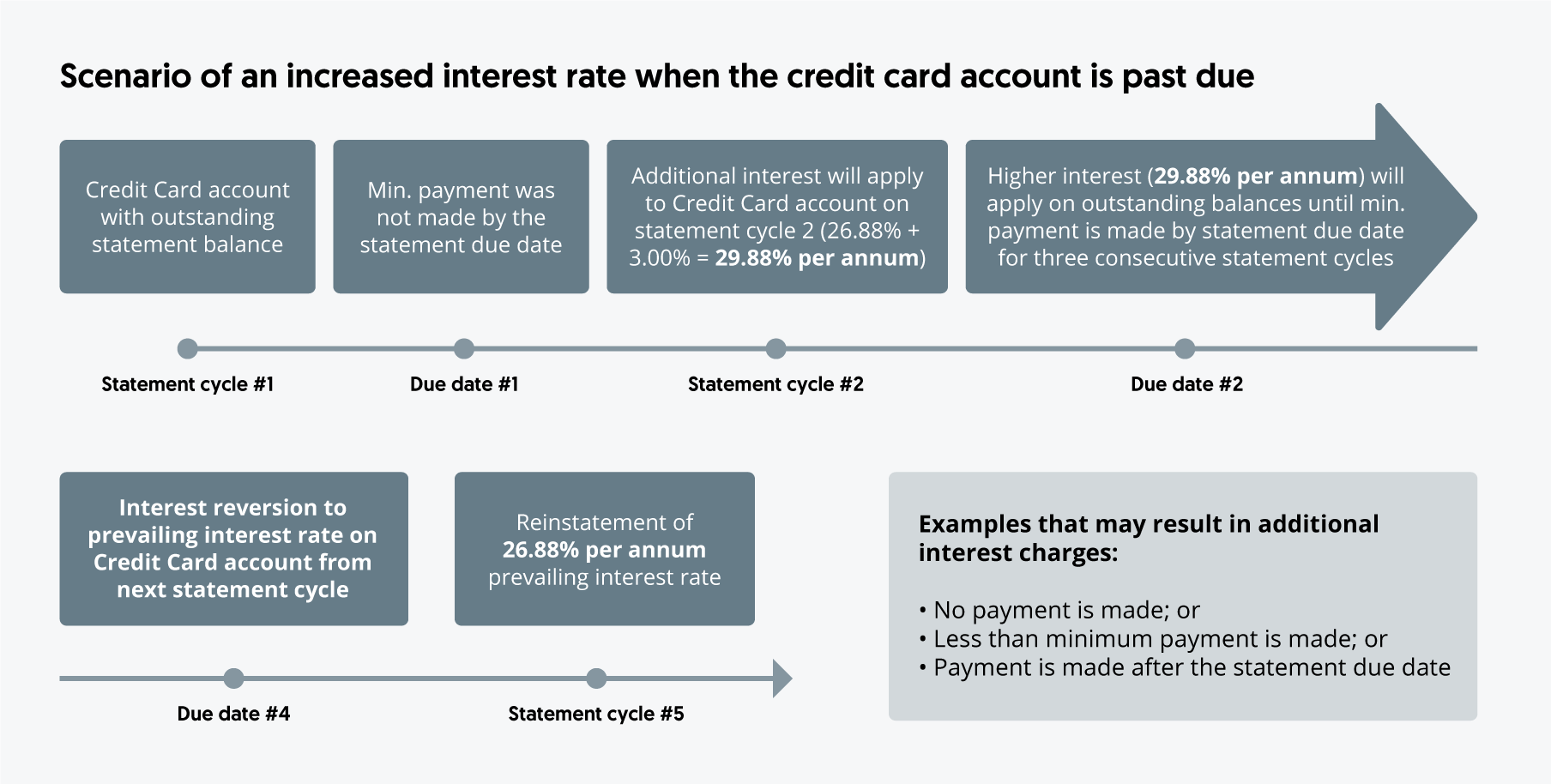
What is an additional interest charge?
It is an additional interest charge by the bank on top of the current prevailing interest rate per annum when a cardmember does not make the minimum payment by the specified statement due date.
Additional interest will apply to primary and supplementary credit card accounts and all outstanding balances except cash advance.
-
I am an existing credit cardmember with additional interest charges at 29.88% per annum, how can I revert my assigned rate to the prevailing interest of 26.88% per annum?
This interest rate will revert to the prevailing interest rate of 26.88% per annum when you make the minimum payment on time for three (3) consecutive months.
-
-
Applying for a Card Online
-
Why should I use Myinfo to complete my application?
Myinfo contains Singapore government verified information on you, which you can allow banks to use in support of your application. By using Myinfo, majority of the fields in the application form will be auto-populated with this information, thereby shortening the entire application process including providing you with an almost immediate application outcome.
-
If I use Myinfo to make my application, is it possible to edit fields pre-filled by Myinfo? If so, what are the editable fields?
As Myinfo contains Singapore government verified information, only some fields within Myinfo are editable, such as mobile number, email address, name of employer (if you are a Singaporean or PR) and education level. If you wish to update any of the details reflected in the non-editable fields, you can approach the relevant agencies, as indicated in Myinfo, to update.
If you happen to be using a different mailing address from your address on Myinfo, please fill in the other form instead.
-
I am an existing OCBC credit card holder. Can I apply for a 2nd credit card via this channel?
If you intend to apply for a 2nd credit card and are happy with your existing credit limit, we suggest you do so via Internet Banking to receive instant approval. You will then be able to view your card details instantly through the link that we send to you via SMS and email.
-
I am currently receiving the bank's one-time passwords through a mobile number that is different from the one I used in my application. Will this change with my application?
No, your one-time passwords will continue to be sent to the original mobile number.
-
I completed my application at a roadshow. Is this different from applying through the bank's website?
Your application is not processed when you click submit at a roadshow. After an hour from the point that you have submitted it digitally, you will be sent an SMS and email, with a link for you to click to trigger for instant processing.
-
When will I be required to use the hardcopy application form?
You will need to use the hardcopy application form only if you are applying for a supplementary card or/and when your mailing address is one that is outside of Singapore. Do visit any of our branches for a hardcopy form.
-
What are the system downtimes and how will I be impacted by it?
Daily from 9.30pm to 6am, as well as on Sundays and Public Holidays (specifically for ExtraCash Loans), you may receive an approved status confirmation but not receive the SMS and email notifications that carry the link to the details of the newly applied product, nor will you be able to see the newly approved product in Internet Banking.
Also, daily from 12am to 8am, due to the maintenance of Credit Bureau system, your unsecured credit card or loan/line application will not be able to get an instantaneous outcome.
-
How would I be contacted should my application require pending documents or has been rejected?
You will receive an email ‐ one for each product applied for, and a physical letter informing you of the documents you require for your application, should your application require further documents. You will receive an email and physical letter if your application has been rejected.
-
-
Instant Usage of Digital Card
-
What is a digital card?
With a new debit or credit card application, a digital card will be made available instantly once your primary card application is approved. Communications in form of SMS and email will be sent to your bank registered mobile and email address. You can add the digital card to your mobile wallet e.g. Apple Pay etc and start using it – no activation is required. If you wish to make purchases via any website or app, you can also use the digital card details to complete the transaction.
Please note that the digital card will only be made available to primary cardholders only, if you are applying for a supplementary card, a digital card will not be made available. Your digital card will have the same card number and expiry date as the physical card that you will receive. The only difference between the digital card and physical card is that of the CVV.
If you wish to make purchases via any website or app, please note that you can only do so at those that requires CVV.
-
How can I retrieve my digital card details upon approval?
You can retrieve your digital card details via ocbc.com:- Navigate via ocbc.com to the card that you have applied for
- Click on the "Apply or Retrieve Details" button
- Select "Retrieve digital card details with my reference code"
- Enter the reference code that is found in the SMS or email that was sent to you notifying you of the successful card application
- Enter the SMS OTP sent to your bank registered mobile number
Your digital card details will be available once you’ve completed the above. If you have applied for a Debit Card, to start using your digital Debit Card, you will have to log in to Online Banking to view the newly created deposit account details and deposit money into that account that is linked to your debit card, before using the card.
-
What can my digital card be used for? Are there any restrictions that come along with using my digital card?
Your digital card can be used for online and in-app purchases, recurring payments (e.g. Great Eastern policy premiums and on mobile wallet like Apple Pay, Samsung Pay and Android Pay.)
Note that for your safety, the bank will decline digital card transactions whereby the eCommerce merchants do not request for your digital CVV (the 3 digits beside the signature panel at the back of the card image).
To transact at these merchants, you will need to first activate your physical card.
-
When will the CVV of the digital card be valid till?
The CVV of the digital card will remain valid till its expiry date or when you activate the physical card.
-
Is there a need to re-enter my card details when I receive my physical card?
If you have already used the digital card before activating your physical card, we recommend that upon activating your physical card, you should re-enter card details for eCommerce and card-on-file transactions. There will be no need to re-provide the card details for recurring payment, e.g. insurance premiums and Mobile Wallet transactions.
-
-
Credit Card Payment Methods
As some payment methods may require more processing time, we encourage you to pay your bills early to avoid incurring late fees. The methods marked with an asterisk are instant – just click here to find out how to use them.
Payment methods Processing time required OCBC ATM*
OCBC Cash Deposit Machine*
OCBC Online Banking and OCBC Digital app*
Phone Banking*
Instant once transaction is completed. InterBank GIRO*
Automatic deduction will be made on the payment due date from the bank account indicated in your InterBank GIRO application form
Please ensure that there are sufficient funds in the account at least one day before the payment due date.
FAST Funds Transfer from any participating bank’s online banking platform*
Almost instant once transaction is completed.
Refer to the Association of Banks in Singapore’s website for a list of participating banks.
Cheque
- Crossed and made payable to “OCBC Bank”
- Do not post-date your cheques
Three business days after we receive the cheque.
You may drop the cheque into our Quick Deposit boxes at any OCBC Bank branch in Singapore or mail it to us. Please click here to download an envelope.
Cash Payment at any OCBC Bank branch
Same day
AXS Station
AXS m-Station (mobile app)
AXS e-Station (web-based)
Same day if payment is made by 11:59pm. Payments made after 11:59pm will be processed the next calendar day.
Remember to pay the bill for each card account separately.
NETS or CashCard via iNets Kiosks
Same day if payment is made before 5pm. Payments made after 5pm will be processed the next calendar day.
You should pay the bill for each card account separately.
Another Bank’s Internet Banking Service
Up to three business days.
-
ATM withdrawal and Visa/Mastercard spending limit
OCBC Internet Banking
- Log in to OCBC Online Banking with your access code and PIN or Singpass
- Scroll over “Customer Service” then “Cards services” and select “Manage card daily limit”
- Select card to change the ATM withdrawal or spending limit
- Select the new limit. Tap on the "Next" button
- Tap on the “Submit” button to confirm
OCBC Digital app
- Log in to OCBC Digital app
- Tap on the menu bar on the top left of the screen
- Tap on “Card services”
- Select “Manage card daily limit”
- Select card to change the daily limit
- Select the limit amount you prefer for withdrawal and spending
- Tap on the “Next” button
- Tap on the “Confirm” button after reviewing the changes
Via other channels
Visit your nearest OCBC branch, or call us (phone banking) at 1800 363 3333. If overseas, call +65 6363 3333.
-
Credit and Debit Card activation
You can activate Credit and Debit card via OCBC the following channel:
Via OCBC Digital
- Log in to OCBC Digital app.
- Tap on the menu bard on the top left of the screen.
- Tap on “Card services”.
- Select “ Activate credit/debit card”
- Select your cards and enter the expiry date of the card to activate.
- Tap on “Next” button
- Tap on “Agree” button after reviewing the Term and Conditions
- Tap on “Submit” button after reviewing the card activations.
Via OCBC Internet Banking
- Log in to OCBC Digital app.
- Scroll over “Customer Service” then “Card services” and select “Activate credit/debit card”
- Select your cards and enter the expiry date of the card. Check the Term and conditions
- Tap on “Next” button
- Tap on “Submit” button after reviewing the card activations.
Alternatively you can use card activation form here
-
How to enable/disable Cash Advance
To enable/disable Cash Advance feature, please use any of the following options.
OCBC Digital app:
- Log in to OCBC Digital app
- Tap on the top left menu
- Select “Card services”
- Select “Manage Cash Advance”
- Select the relevant card(s) to enable/disable
OCBC Online Banking:
- Log in to OCBC Online Banking
- Go to “Customer Service”
- Select “Manage Cash Advance”
- Select the relevant card(s) to enable/disable
-
How to change the Cash Advance limits and channels
To change the Cash Advance limit and channels, please use any of the following options.
OCBC Digital app:
- Log in to OCBC Digital app
- Tap on the top left menu
- Select “Card services”
- Select “Manage Cash Advance”
- Select the relevant card(s) to enable/disable
OCBC Online Banking:
- Log in to OCBC Online Banking
- Go to “Customer Service”
- Select “Manage Cash Advance”
- Select the relevant card(s) to enable/disable
-
How to apply for EasiCredit and Card Waiver
Credit Card Fee Waiver
To submit a credit card fee waiver request, please use any of the following options:
Via Internet Banking
- Log in to OCBC Internet Banking
- Go to "Customer Service"
- Select "Credit card fee waiver"
Via OCBC Digital
- Log in to OCBC Digital app
- Tap on the top left menu
- Tap on "More services" → "Card services" → "Credit card fee waiver"
Via Phone Banking
- Have your credit card ready
- Call us and when prompted, and say "credit card fee waiver"
- Key in your 16-digit card number when prompted
Your waiver request is subject to approval. You will be notified on the outcome immediately.
EasiCredit Fee Waiver
To submit an EasiCredit waiver request, please follow below instructions in our Phone Banking system:
Press <1> for English
Press <1> for Phone Banking menu
Press <*2> for Fee waiver
Press <2> for EasiCredit
Key in your 7-digit NRIC number or 12-digit Easicredit account number
Press <1> to confirm
Customer will be prompted to key in registered mobile number
Press <1> to confirm mobile numberYour waiver request is subject to approval. You will be notified of the outcome via SMS in 5 business days.
-
Credit Card Fees & Charges
View Fees & Charges for Credit Cards.
All foreign currency transactions are subjected to a currency conversion charge imposed by the respective card associations and bank administrative fee of the foreign transaction amount.
We will be revising the Credit Card fees & charges on 8 May 2023. View the Fees & Charges for Credit Cards.
-
Debit Card Fees & Charges
We will be revising the Debit Card fees & charges on 1 January 2023. View the Fees & Charges for Debit Card.
-
Automatic Annual Fee Waiver
No card annual fee will be charged for the first 1 or 2 years, depending on the OCBC Card issued to you. After this, just meet the minimum spending for 1 year - starting from the month after your card was issued - to earn an annual fee waiver for your OCBC Card.
What counts towards the minimum amount you must spend:
Retail transactions, monthly Instalment Payment Plans and monthly PayLite instalments, so long as the amount is shown in your statement during the year.What does not count towards the minimum amount you must spend:
Cash-On-Instalments, cash advances and bank charges and any refunded amounts.OCBC card Annual Service Fee Fee waiver period (after card is issued) Minimum spending required to have your Annual Service Fee automatically waived OCBC Rewards Card S$196.20 2 years S$10,000 OCBC Titanium Credit Card S$196.20 2 years S$10,000 OCBC 365 Credit Card S$196.20 2 years S$10,000 OCBC NXT Credit Card S$163.50 2 years S$10,000 OCBC Great Eastern Cashflo Credit Card S$163.50 2 years S$5,000 FRANK Credit Card S$196.20 2 years S$10,000 OCBC Arts Credit Card S$163.50 2 years S$10,000 BEST-OCBC Credit Card S$163.50 2 years S$5,000 OCBC Platinum Credit Card S$163.50 2 years S$10,000 OCBC INFINITY Cashback Card S$196.20 1 year S$10,000 OCBC 90°N Mastercard S$196.20 1 year S$10,000 OCBC 90°N Visa Card S$196.20 1 year S$10,000 OCBC Debit Card S$20.00 Waived perpetually if your card application was approved on or after 1 November 2012 S$1,800 if your card application was approved before 1 November 2012 FRANK Debit Card Free N.A. N.A. We have not included the minimum spending required to have the Annual Service Fee automatically waived for the following cards: OCBC VOYAGE, OCBC Premier VOYAGE and Bank of Singapore VOYAGE Credit Card. For details, please call +65 6438 6088 or contact your Relationship Manager.
-
Handling of excess credit balance
Please arrange a refund with us if any of your Credit Card/EasiCredit accounts exceeds $50,000.
Please check if the credit balance in any of your Credit Card/EasiCredit accounts exceeds $50,000*.
If so, please contact us to arrange for a refund of your excess credit balance, which can be performed either via funds transfer to a current/savings account, or via a Cashier’s Order.
Alternatively, you may use your entire excess credit balance balance.
This is so that the credit balance in your each of your accounts do not exceed $50,000* for more than 30 consecutive days.
Why refund the excess credit balance if any of my Credit Card/EasiCredit account(s) exceed(s) $50,000*?
We have recently revised our relevant Credit Cardmembers Agreements and the Terms and Conditions Governing Personal Line of Credit (collectively, the Relevant Terms) on 1 January 2017.
Therefore, we have the discretion to refund any amount of credit balance in your credit card/EasiCredit account(s)via such mode as set out in the Relevant Terms.
We thank you for your understanding, and apologise for any inconvenience caused.
* This amount may change in future
Nothing stated above shall prejudice OCBC’s rights under the relevant terms and conditions and/or agreements governing the credit card/Easicredit accounts.
-
Check card balance and available credit
Internet Banking
- Upon logging into OCBC Online Banking, click “Your Accounts”
- From the drop-down, click “Overview”
- Scroll down to view “What you owe (Liabilities)”; Credit Cards.
- Look for “Amount Due” for the specific card type
OCBC Digital
- Log in to OCBC Digital app.
- Select "What you owe".
- Select the relevant Credit Card to view your Credit Card balance.
Phone Banking
- Dial 1800 363 3333 or +65 6363 3333 (if overseas)
- Select Language Preference
- Press *3 and enter your phone banking access code and PIN followed by #
- Select 1 for Balance and transaction
- Select 1 for Balance
- Select 1 for Credit Card
Note: Your credit card balance does not include any payment or transaction made today
SMS Banking
SMS in to check on your credit card latest statement outstanding balance
-
Check and redeem OCBC$
Online Banking
- Login to online banking.
- Under "Rewards", select "Rewards".
- Click "Redeem your rewards" and a new browser will open automatically.
- Select card type and click "next".
- Select the rewards category you are interested in.
- Select the Account / Card No. to redeem from. Your OCBC$ Rewards voucher will be sent to the corresponding mailing address of the selected account. To redeem an OCBC$ Reward that requires OCBC$ and cash, please select a credit card account as the cash component will be debited from your credit card account.
- Select your desired OCBC$ Reward and click "add to cart".
- Select the OCBC Card number you wish to use to make your redemption.
- Select the quantity of the reward.
- Select "Check Out" to confirm redemption or click ‘Continue Shopping’ to continue redeeming more OCBC$ Rewards.
- To redeem an OCBC$ Reward that requires OCBC$ and cash, please select a credit card account as the cash component will be debited from your credit card account.
- An OCBC$ Rewards voucher will be sent to you within 7 working days.
Phone Banking
- Call 1800 363 3333 or +65 6363 3333 when overseas.
- Press 1 for English, 2 for Mandarin
- Press *3 and enter your phone banking access code and PIN followed by #
- Press 3 for Rewards, temp limit increase or PIN change
- Press 1 for Rewards Redemption.
- Enter your 16-digit Credit Card Number follow by #.
- Press 1 to confirm.
- Enter the 6-digit product code.
- Enter quantity of the reward.
- Press 1 to confirm
- An OCBC$ Rewards Voucher will be sent to you within 7 working days
Note: This service is applicable to principle card only.
SMS Banking
SMS in for rewards redemption
-
View credit card transactions
View them on online banking.
- Upon logging in to online banking, click “Your Accounts”.
- From the drop-down menu, click “Overview”.
- Scroll down to view “What you owe (Liabilities)”; Credit Cards
- Click on the specific card type.
- After clicking on the specific card type, select "Details / Transactions" from the popout tooltip.
-
Retrieve past statements
- Upon logging in to online banking, click “Your Accounts”.
- From the drop-down, click “Overview”.
- Scroll down to view “What you owe (Liabilities)”; Credit Cards.
- Click on the specific card type.
- From the drop-down menu, click “Documents”.
-
Revert to paper statements
Yes. You can give us your instructions to revert to paper statements.
Revert via online banking:
- Upon logging in to online banking, click "Your Accounts"
- From the drop-down menu, click "Overview"
- Scroll down to view "What you owe (Liabilities)", Credit Cards
- Click on the specific card type
- From the drop-down menu, click "Documents"
- Click "Manage Documents" on the left
- Uncheck the respective credit card account to opt out of eStatements
-
Activation/ deactivation of cards for overseas card usage
Please refer to the Overseas Usage Guide to find out how to activate or deactivate your card(s) for overseas cash withdrawal or overseas purchases.
-
Foreign Currency Transactions
All Foreign currency transactions made in US dollars will be converted into Singapore dollars at the rate determined by the respective card associations or such rates as the Bank may determine from time to time. Transactions made in foreign currency other than US dollars will first be converted to US dollars before they are converted into Singapore dollars at the rate determined by the respective card associations (Visa or MasterCard International) or such rates as the Bank may determine from time to time. The conversion rate is applied on the date of posting to the Card Account and may be different from the rate in effect on the date of transaction.
All foreign currency transactions mentioned above (including reversals and refunds) will be subject to the following:
Until 3 December 2019, all foreign currency transactions are subjected to a currency conversion charge imposed by the respective card associations (1%) and a bank administrative fee (2%) of the foreign transaction amount.
From 3 December 2019, all foreign currency transactions charged to OCBC Credit Cards are subjected to a currency conversion charge imposed by the respective card associations (1%) and a bank administrative fee (2.25%) of the foreign transaction amount.
-
Singapore Dollar Transactions processed Overseas
An additional fee will be levied on all Visa and MasterCard transactions effected in Singapore dollars and processed overseas (including online transactions). This includes but is not limited to (i) any Visa or MasterCard retail transaction presented in foreign currency that you choose to pay in Singapore dollars via dynamic currency conversion and (ii) any online retail card transaction charged to your Visa and MasterCard cards on overseas websites in Singapore Dollars. The additional fee charged is 1% on all converted Singapore dollar amounts for each Visa and MasterCard transaction.
-
Submit required documents for credit card application
Upload document for Card Applications
-
Dispute credit card transactions
You can raise credit card transaction dispute via OCBC Online Banking.
OCBC Internet Banking
- Log in to OCBC Online Banking with your access code and PIN
- Scroll over "Customer Service" then "Card services" and select "Dispute credit card transaction"
- Select your card and transaction to dispute.
- Select 'reason' for your dispute and submit necessary information/attach supporting documents to submit your dispute.
OCBC Digital
- Log in to OCBC Digital app.
- Tap on the menu bar on the top left of the screen.
- Tap on "Card services".
- Select "Dispute transactions".
- Select your card and transaction to dispute.
- Indicate your reason for dispute and submit necessary information/attach supporting documents to submit your dispute.
Learn more about card fraud and dispute resolution with these FAQs from ABS
Alternatively you may follow these steps to raise a dispute:
- To raise a dispute on your credit or debit card transactions, print and complete the Dispute Declaration Form
- Attach relevant supporting documents (if applicable)
- Email or mail the completed Dispute Declaration Form to the Bank
Unauthorised transactions should be reported to the Bank within 7 days upon receiving Cards statement, or immediately upon receiving SMS notification alerts for the unauthorised transaction. The Bank will require you to submit the necessary information or supporting documents. The Bank will assist you to report the unauthorised transactions to the associations e.g. Visa or Mastercard in accordance with their respective rules. The fraud-related dispute rules relating to unauthorised transactions has a limit of up to 35 claims for Visa Cards and up to 15 claims for Mastercard Cards. There is no dispute rights for fully authenticated transactions such as transactions with One Time Password input. All decisions are subject to the respective association's sole discretion. The information on limits is correct as at November 2019.
-
Credit Card and Debit Card Maintenance
-
Pending transactions
Frequently Asked Questions
-
Why is my transaction listed as ‘Pending’?
The transaction has been authorised and the amount set aside from your credit limit. ‘Pending’ is shown as the merchant has not processed the transaction. Once this is done, the amount will be deducted and the ‘posted date’ shown. -
Where can I see my ‘Pending’ transactions?
I can view my pending transactions on the dashboard – under ‘Your activity’, individual card transaction history, and transaction details pop-up in the OCBC Digital app. -
Will I be charged if my transaction is ‘Pending’?
The transaction amount will be held against your available credit limit while the transaction is pending. However, no payments are required until the transaction has been billed in your statement. -
Why does the charged amount for foreign currency transactions differ when it’s pending versus posted?
The amount shown reflects the exchange rate applied by the card associations at the time the transaction took place. However, this rate may change, depending on when transaction is posted to the account. -
Will pending transactions count towards or affect my card rewards/cashback?
Card rewards/cashback are calculated based on posted date of transaction as per respective cards’ terms and conditions. Hence, pending transactions will not count towards card rewards/cashbacks. -
Will my ‘Pending’ transactions be reflected instantly on the OCBC Digital app?
Your pending card transactions will be reflected instantly on the OCBC Digital app, except from 12am to 5am SGT. Transactions performed from 12am to 5am SGT will only be shown on the OCBC Digital app after 5am.
-
Why is my transaction listed as ‘Pending’?
-
Transaction and posted date
What is the difference between transaction date and posting date?
Transaction date refers to the date when a purchase is made.
Posting date refers to the date the transaction is received by the card issuer, OCBC Bank. As merchants may make a settlement a few days after the transaction has been made, posting date may be a few days later than the transaction date. As such, the bank has no control over when merchant records the transaction.
Once a transaction is posted, it will be reflected in your Internet Banking transaction history.
-
Credit limit
Why has my credit limit gone down when I cannot see the transaction in my Internet Banking?
When you perform a transaction, the amount will be earmarked from your credit limit first. However, you may not see the transaction within Internet Banking because the transaction has yet to be posted. Once the merchant records the transaction and the transaction is posted to your card, you will be able to see the transaction within Internet Banking and the amount will be deducted from your credit limit.
Why doesn't the total available credit limit on my statement match with the spending on my cards?
The total available credit limit on your statement takes into account the outstanding and earmarked amount on all your cards.
For example:
Card 1 Card 2 Card 3 Outstanding amount S$500 S$500 S$500 Earmarked amount S$700 - S$250 Total credit limit S$10,000 Total available credit limit S$7,550 It is also the total available credit limit at the point your statement was generated, so it will not include any transactions made after your statement was generated.
For a more accurate total available credit limit, you can log in to OCBC Internet Banking or your OCBC Digital app.
-
Reset credit or debit card PIN
You can request for a new PIN for your OCBC Credit and Debit Card via OCBC Online Banking.
OCBC Internet Banking
- Log in to OCBC Online Banking with your access code and PIN.
- Navigate to "Customer Service" then "Cards services" and select “Reset Card PIN".
- Select your card.
- Set up your new 6-digit PIN.
OCBC Digital
- Log in to OCBC Digital app.
- Tap on the menu bar on the top left of the screen.
- Tap on "Card services".
- Select “Reset card PIN".
- Select your card that you wish to reset the card PIN.
- Set up your new 6-digit PIN.
-
Request for a replacement card
You can request for a replacement card via OCBC Online Banking.
OCBC Digital
- Log in to OCBC Digital app.
- Tap on the menu bar on the top left of the screen.
- Tap on "Card services".
- Select “Replace Card".
- Select your card that you wish to replace.
- Select the reason why you are replacing your card.
-
Due date
How do I know when my due date is? Why does my due date keep moving?
Your statement generation date is fixed each month. You can find your statement generation date on your statement.
Your due date will then be 23 calendar days from the statement date.
If the due date falls on Saturday/Sunday/Public Holiday, the payment due date will then fall on the previous working day
-
Transaction alerts
How do I get notified for transactions done on my card?
When a transaction exceeding a default amount set by OCBC is deducted from your credit card account, we will send you an SMS notification alert. This alert serves as a fraud prevention measure. If you have not authorised the transaction, please contact us immediately.
Visit bit.ly/2MA4K0q for FAQs and to find out how to set SMS alerts